Showing posts with label Objective C. Show all posts

Friday, May 1, 2015

Defining a service layer with AFNetworking

This example shows how to create a service layer for json based web services. This is how I developed it.
  1. Create a basic interface for calling web services
  2. Create a subclass of correct AFNetworking seralizer class(in this case AFJsonSerializer) and format the response
  3. For each web service create a singleton subclass of AFHttpSessionManager
  4. Create a Façade for service layer
For this example I am using free web service used used by raywenderlich afnetworking tutorial

1 Creating basic interface
In modern software engineering, we write code for the interface, not for the implementation. So create a protocol named Service as folows
@protocol Service <NSObject>

- (void)callService:(NSDictionary*)parameters withCompletionBlock:(void(^)(NSArray *resultArray, NSError *error))completionBlock;

@end

This has a method called callService and it is the method used to call the web services. Now we have an interface, which can be used to call web services. I will explain the importance of this when we actually call a web service.

2 Creating a custom json response serializer
Here, we get the response in json format. we need to process this json response in order to get the correct result out of it. For that purpose we can create a subclass of the AFJSONResponseSerializer class and override it's responseObjectForResponse as follows. This method is overridden according to the json response we get. This method directly create models from the response and add it to an array
@implementation WeatherServieJasonSerializer

- (id)responseObjectForResponse:(NSURLResponse *)response
                           data:(NSData *)data
                          error:(NSError *__autoreleasing *)error {
    NSMutableArray *retArray = [[NSMutableArray alloc] init];
    NSDictionary *json = [super responseObjectForResponse:response data:data error:error];
    NSDictionary *dictionary = json[@"data"];
    WeatherInfo *infoRet = [[WeatherInfo alloc] init];
    NSArray *arrData = dictionary[@"weather"];
    
    infoRet.tempMaxC = @([((NSString*)((NSDictionary*)arrData[0])[@"tempMaxC"]) integerValue]);
    infoRet.tempMaxF = @([((NSString*)((NSDictionary*)arrData[0])[@"tempMaxF"]) integerValue]);
    infoRet.tempMinC = @([((NSString*)((NSDictionary*)arrData[0])[@"tempMinC"]) integerValue]);
    infoRet.tempMinF = @([((NSString*)((NSDictionary*)arrData[0])[@"tempMinF"]) integerValue]);
    
    [retArray addObject:infoRet];
    
    return retArray;
}
@end
 
3 Creating a singleton subclass of AFHttpSessioManager to invoke web services.
For each web service you have, you need to create a separate class like this. In addition this class conform to the Service protocol and implements its callService method. Following is the code for the class.
.h file
#import "AFHTTPSessionManager.h"
#import "Service.h"

@interface WetherWebService : AFHTTPSessionManager<Service>

+ (WetherWebService*)getSharedInstance;

@end

.m file
#import "WetherWebService.h"
#import "WeatherServieJasonSerializer.h"

static NSString * const baseURLString = @"http://www.raywenderlich.com/demos/weather_sample/";

@implementation WetherWebService

+ (WetherWebService*)getSharedInstance {
    static WetherWebService *sharedInstance = nil;
    static dispatch_once_t token;
    dispatch_once(&token, ^{
        sharedInstance = [[WetherWebService alloc] initWithBaseURL:[NSURL URLWithString:baseURLString]];
        sharedInstance.responseSerializer = [WeatherServieJasonSerializer serializer];
    });
    
    return sharedInstance;
}

- (void)callService:(NSDictionary*)parameters withCompletionBlock:(void(^)(NSArray *resultArray, NSError *error))completionBlock {
    [self GET:@"weather.php" parameters:parameters success:^(NSURLSessionDataTask *task, id responseObject) {
        completionBlock(responseObject, nil);
    } failure:^(NSURLSessionDataTask *task, NSError *error) {
        completionBlock(nil, error);
    }];
}

@end
 
4 Creating the service layer façade.
This is an implementation of façade design pattern. This creates an abstraction layer between the web service layer and the rest of the application. This is the source of ServiceLayerFacade.h file
@interface ServiceLayerFacade : NSObject

+ (ServiceLayerFacade*)getSharedInstance;
- (id<Service>)getWeatherService;

@end
#import "ServiceLayerFacade.h"
#import "WetherWebService.h"

@implementation ServiceLayerFacade

+ (ServiceLayerFacade*)getSharedInstance {
    static ServiceLayerFacade *sharedInstance = nil;
    static dispatch_once_t token;
    dispatch_once(&token, ^{
        sharedInstance = [[ServiceLayerFacade alloc] init];
    });
    
    return sharedInstance;
}
- (id<service>)getWeatherService {
    return [WetherWebService getSharedInstance];
}
This is how these web services should be called.
NSDictionary *parameters = @{@"format": @"json"};
    ServiceLayerFacade *serviceLayer = [ServiceLayerFacade getSharedInstance];
    id<Service> weatherWebService = [serviceLayer getWeatherService];
    [weatherWebService callService:parameters withCompletionBlock:^(NSArray *resultArray, NSError *error) {
        if (resultArray[0] != nil) {
            id<Tablelayout> tableModel = resultArray[0];
            _tableArray = [tableModel getTableRepresentation];
            [_weatherTable reloadData];
        }
    }];
Here, since we are using interfaces and a facade, we can completely hide the implementation details of the web service layer. Web service caller only knows of the uniform interface method to call the web service. He does not know the classes used to call the web service, the way response is processed etc. What he gets is model classes that can be directly used in his code. Now I will explain the beauty of this approach. We use Service interface to access the web service. And we do not know how the web service is called behind the scene and how the response is processed. Because of this we can change everything related to web service calling and processing without affecting rest of the layers.

Presenting the data
This is our model class
#import 

@interface WeatherInfo : NSObject

@property NSNumber *tempMaxC;
@property NSNumber *tempMaxF;
@property NSNumber *tempMinC;
@property NSNumber *tempMinF;

@end
Now we have the data retrieved from the web service stored in our model classes. Now how to present it? You can add a method to the model class to get some sort of array and show it in a table. But this is an extremely bad idea. Because a model class should not know how the data is presented. So here our basic problem is adding behavior to the model object, without affecting behavior of other objects from the same class. What is the design pattern we can use to achieve this? The answer is decorator pattern
 
Implementation of decorator pattern
I normally use categories to implement decorator pattern in objective c. In addition I declare category methods in a protocol as well. This protocol acts as an interface
#import 

@protocol TableLayout <NSObject>

-(NSArray*)getTableRepresentation;

@end

This is the category of the model class.
.h file
#import "WeatherInfo.h"
#import "TableLayout.h"

@interface WeatherInfo (TableRepresentation)<TableLayout>

@end

This is the .m file
#import "WeatherInfo+TableRepresentation.h"

@implementation WeatherInfo (TableRepresentation)

-(NSArray*)getTableRepresentation {
    return [[NSArray alloc] initWithObjects:self.tempMaxC,self.tempMaxF,self.tempMinC,self.tempMinF, nil];
}

@end
Then in code via the TableLayout interface I am getting the table representation as follows.

id<Tablelayout> tableModel = resultArray[0];
            _tableArray = [tableModel getTableRepresentation];
            [_weatherTable reloadData];
This is how I implemented the service layer. The complete example of this tutorial is available in GitHub.

Alternative approaches
  • This stackoverflow question presents few ways of developing a service layer using AFNetworking and ReactiveCocoa
  • You can use RestKit to get Core data models directly after web service calls

For any query, feel free to contact me via my linkedin profile. Happy coding!!!!

Monday, February 2, 2015

Autolayouting for dynamically changing views in iOS(with complex UITableViewCells and UIButtons)

I have used both IB based and code based approach with autolayout. If the view is static the solution is very easy. You can use the easiest way, the IB based autolayouting. But if the view is dynamic, I have used code base and IB based approach plus few tricks.
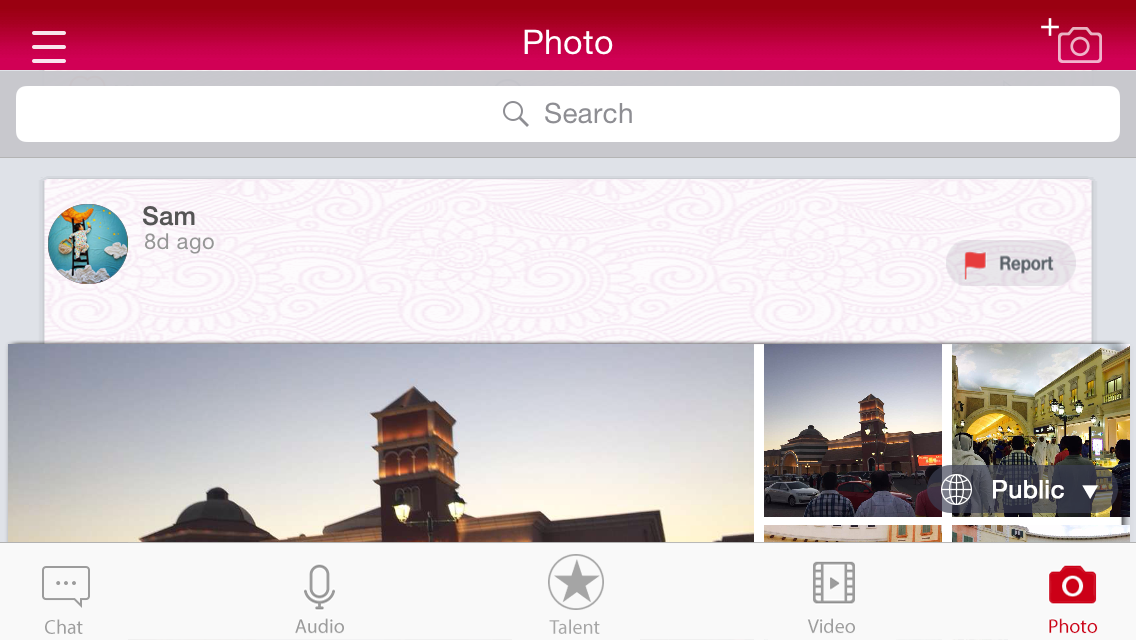
Consider following screen shots

First image is taken when device is in landscape mode and second image is taken when the device is in portrait mode. Now consider the image that contains a camera, which is located at top right corner. Actually it is a UIButton with an image. If you examine carefully you will notice that the top inset of the element in the landscape mode is much lower that the in the potrait mode. This is how I implemented it.
  • Add left insets in the interface builder
  • programmatically add top insets according to the orientation
  • When the orientation change programmatically change the top insets and call setNeedsUpdateConstraints method on that view

Add these two constants in after #import section
static int buttonTopinsetLandscape = 1;
static int buttonTopinsetPotrait = 14;


- (void) adjustViewsForOrientation {
    [self addInsets];
    [photoBtn setNeedsUpdateConstraints];
}

- (void) addInsets {
  self.constraint = [NSLayoutConstraint constraintWithItem:photoBtn
         attribute:NSLayoutAttributeTop
         relatedBy:NSLayoutRelationEqual
            toItem:self.view
         attribute:NSLayoutAttributeBottom
        multiplier:1.0
          constant:[self getButtonTopinset]];

  [self.view addConstraint:constraint];
}

- (int)getButtonTopinset {
    return [self returnCurrentInset:buttonTopinsetLandscape withPotrait:buttonTopinsetPotrait];
}

- (int)returnCurrentInset:(int)landscape withPotrait:(int)potrait {
    UIInterfaceOrientation orientation = [UIApplication sharedApplication].statusBarOrientation;
    if (orientation == UIInterfaceOrientationPortrait || orientation == UIInterfaceOrientationPortraitUpsideDown) {
        return potrait;
    } else if(orientation == UIInterfaceOrientationLandscapeLeft || orientation == UIInterfaceOrientationLandscapeRight) {
        return landscape;
    } else {
        return potrait;
    }
}


In viewwillappear method add notification to listen to orientation changes as follows.
[[NSNotificationCenter defaultCenter] addObserver:self selector:@selector(adjustViewsForOrientation) name:UIDeviceOrientationDidChangeNotification object:nil];

That's cool right? lets move in to much complex example. Look at the following table view.
---UPDATE---- The example for this part of the tutorial is now available on GITHub as well.
Each cell has different number of UIImageViews from one to four. Number of UIImageViews to be displayed can only be determined at run time. And the each cell changes the image view dimensions according to orientation. Here I have to use code based approach. I have used VFL here.
When there are two image Views
NSDictionary *views = NSDictionaryOfVariableBindings(imgViewOne,imgViewTwo);
            
            [cell.contentView addConstraints:[NSLayoutConstraint constraintsWithVisualFormat:@"H:|-4-[imgViewOne(imgViewOne)]-5-[imgViewTwo(imgViewOne)]-3-|" options:0 metrics:nil views:views]];
            
            [cell.contentView addConstraints:[NSLayoutConstraint constraintsWithVisualFormat:@"V:|-95-[imgViewOne]-88-|" options:0 metrics:nil views:views]];
            [cell.contentView addConstraints:[NSLayoutConstraint constraintsWithVisualFormat:@"V:|-95-[imgViewTwo]-88-|" options:0 metrics:nil views:views]];

Here image views share the same width. Here they will retain there left and right insets to the superview and adjust their widths accordingly.
When there are three image Views

[cell.contentView addSubview:imgViewOne];
            [cell.contentView addSubview:imgViewTwo];
            [cell.contentView addSubview:imgViewThree];
            
            imgViewOne.translatesAutoresizingMaskIntoConstraints = NO;
            imgViewTwo.translatesAutoresizingMaskIntoConstraints = NO;
            imgViewThree.translatesAutoresizingMaskIntoConstraints = NO;
            
            NSDictionary *views = NSDictionaryOfVariableBindings(imgViewOne, imgViewTwo, imgViewThree);
            
            [cell.contentView addConstraints:[NSLayoutConstraint constraintsWithVisualFormat:@"H:|-4-[imgViewOne(imgViewOne)]-5-[imgViewTwo(imgViewOne)]-3-|" options:0 metrics:nil views:views]];
            [cell.contentView addConstraints:[NSLayoutConstraint constraintsWithVisualFormat:@"H:|-4-[imgViewOne(imgViewOne)]-5-[imgViewThree(imgViewOne)]-3-|" options:0 metrics:nil views:views]];
            
            [cell.contentView addConstraints:[NSLayoutConstraint constraintsWithVisualFormat:@"V:|-95-[imgViewOne]-88-|" options:0 metrics:nil views:views]];
            [cell.contentView addConstraints:[NSLayoutConstraint constraintsWithVisualFormat:@"V:|-95-[imgViewTwo(imgViewTwo)]-5-[imgViewThree(imgViewTwo)]-88-|" options:0 metrics:nil views:views]];
Here please note that width of image views are similar and height of imgViewThree and imgViewTwo are similar
When there are four image Views
NSDictionary *views = NSDictionaryOfVariableBindings(imgViewOne, imgViewTwo, imgViewThree, imgViewFour);
            
            [cell.contentView addConstraints:[NSLayoutConstraint constraintsWithVisualFormat:@"H:|-4-[imgViewOne(imgViewOne)]-5-[imgViewThree(89)]-5-[imgViewFour(89)]-3-|" options:0 metrics:nil views:views]];
            [cell.contentView addConstraints:[NSLayoutConstraint constraintsWithVisualFormat:@"H:|-4-[imgViewOne(imgViewOne)]-5-[imgViewTwo(182.5)]-3-|" options:0 metrics:nil views:views]];
            
            [cell.contentView addConstraints:[NSLayoutConstraint constraintsWithVisualFormat:@"V:|-95-[imgViewOne(178)]-88-|" options:0 metrics:nil views:views]];
            [cell.contentView addConstraints:[NSLayoutConstraint constraintsWithVisualFormat:@"V:|-95-[imgViewTwo(115.5)]-5-[imgViewThree(58)]-88-|" options:0 metrics:nil views:views]];
            [cell.contentView addConstraints:[NSLayoutConstraint constraintsWithVisualFormat:@"V:|-95-[imgViewTwo(115.5)]-5-[imgViewFour(58)]-88-|" options:0 metrics:nil views:views]];
            [imgViewTwo setContentHuggingPriority:200
                                        forAxis:UILayoutConstraintAxisHorizontal];
            [imgViewOne setContentHuggingPriority:252
                                        forAxis:UILayoutConstraintAxisHorizontal];
            [imgView3 setContentHuggingPriority:200
                                        forAxis:UILayoutConstraintAxisHorizontal];
            [imgView4 setContentHuggingPriority:200
                                        forAxis:UILayoutConstraintAxisHorizontal];
Looks cool right? But not good enough. Here for example width of each imageview is the same. But what if you need one imageview is three times of the second one? If you try to achieve this with VFL you will get a run time exception. The only way is hard coding the widths which is an extremely bad idea. Then you will have hard time when you deal with different screen sizes and orientations. So VFL is not a viable solution at all.
We still have one option left for autolayoiting. That is using pure objective C based approach without using VFL. Then we can change the height and width of each image more freely.
Assume when you have three images width of the first image is three times the width of the second and third images this is how you should change the code. And when there are four images, width of the first image is three times the width of the second image and six times the third and fourth images
//for one image
NSDictionary *views = NSDictionaryOfVariableBindings(imgViewOne);
            
            [cell.contentView addConstraints:[NSLayoutConstraint constraintsWithVisualFormat:@"H:|-5-[imgViewOne(imgViewOne)]-5-|" options:0 metrics:nil views:views]];
            
            [cell.contentView addConstraints:[NSLayoutConstraint constraintsWithVisualFormat:@"V:|-5-[imgViewOne]-5-|" options:0 metrics:nil views:views]];

//for two images
NSDictionary *views = NSDictionaryOfVariableBindings(imgViewOne,imgViewTwo);
            
             [cell.contentView addConstraints:[NSLayoutConstraint constraintsWithVisualFormat:@"H:|-5-[imgViewOne(imgViewOne)]-5-[imgViewTwo(imgViewOne)]-5-|" options:0 metrics:nil views:views]];
            
           [cell.contentView addConstraints:[NSLayoutConstraint constraintsWithVisualFormat:@"V:|-5-[imgViewOne]-5-|" options:0 metrics:nil views:views]];
            [cell.contentView addConstraints:[NSLayoutConstraint constraintsWithVisualFormat:@"V:|-5-[imgViewTwo]-5-|" options:0 metrics:nil views:views]];

//for three images
NSLayoutConstraint *ratioCons =[NSLayoutConstraint
                                               constraintWithItem:imgViewOne
                                               attribute:NSLayoutAttributeWidth
                                               relatedBy:NSLayoutRelationEqual
                                               toItem:imgViewTwo
                                               attribute:NSLayoutAttributeWidth
                                               multiplier:3
                                               constant:0];
            
            [cell.contentView addConstraint: ratioCons];
            
            NSDictionary *views = NSDictionaryOfVariableBindings(imgViewOne, imgViewTwo, imgViewThree);
            
            // Horizontal layout - note the options for aligning the top and bottom of all views
            [cell.contentView addConstraints:[NSLayoutConstraint constraintsWithVisualFormat:@"H:|-5-[imgViewOne(imgViewOne)]-5-[imgViewTwo]-5-|" options:0 metrics:nil views:views]];
            [cell.contentView addConstraints:[NSLayoutConstraint constraintsWithVisualFormat:@"H:|-5-[imgViewOne(imgViewOne)]-5-[imgViewThree]-5-|" options:0 metric
s:nil views:views]];
            
            [cell.contentView addConstraints:[NSLayoutConstraint constraintsWithVisualFormat:@"V:|-5-[imgViewOne]-5-|" options:0 metrics:nil views:views]];
            [cell.contentView addConstraints:[NSLayoutConstraint constraintsWithVisualFormat:@"V:|-5-[imgViewTwo]-5-[imgViewThree(imgViewTwo)]-5-|" options:0 metrics:nil views:views]];

//for four images
NSLayoutConstraint *ratioConsOne =[NSLayoutConstraint
                                            constraintWithItem:imgViewOne
                                            attribute:NSLayoutAttributeWidth
                                            relatedBy:NSLayoutRelationEqual
                                            toItem:imgViewTwo
                                            attribute:NSLayoutAttributeWidth
                                            multiplier:3
                                            constant:0];
            
            NSLayoutConstraint *ratioConsTwo =[NSLayoutConstraint
                                               constraintWithItem:imgViewOne
                                               attribute:NSLayoutAttributeWidth
                                               relatedBy:NSLayoutRelationEqual
                                               toItem:imgViewThree
                                               attribute:NSLayoutAttributeWidth
                                               multiplier:6
                                               constant:0];
            
            NSLayoutConstraint *ratioConsThree =[NSLayoutConstraint
                                               constraintWithItem:imgViewOne
                                               attribute:NSLayoutAttributeWidth
                                               relatedBy:NSLayoutRelationEqual
                                               toItem:imgViewFour
                                               attribute:NSLayoutAttributeWidth
                                               multiplier:6
                                               constant:0];
            
            [cell.contentView addConstraint: ratioConsOne];
            [cell.contentView addConstraint: ratioConsTwo];
            [cell.contentView addConstraint: ratioConsThree];
            
            NSDictionary *views = NSDictionaryOfVariableBindings(imgViewOne, imgViewTwo, imgViewThree, imgViewFour);
            
            [cell.contentView addConstraints:[NSLayoutConstraint constraintsWithVisualFormat:@"H:|-5-[imgViewOne(imgViewOne)]-5-[imgViewTwo]-5-|" options:0 metrics:nil views:views]];
            [cell.contentView addConstraints:[NSLayoutConstraint constraintsWithVisualFormat:@"H:|-5-[imgViewOne(imgViewOne)]-5-[imgViewThree]-5-[imgViewFour]-5-|" options:0 metrics:nil views:views]];
            
            [cell.contentView addConstraints:[NSLayoutConstraint constraintsWithVisualFormat:@"V:|-5-[imgViewOne]-5-|" options:0 metrics:nil views:views]];
            [cell.contentView addConstraints:[NSLayoutConstraint constraintsWithVisualFormat:@"V:|-5-[imgViewTwo]-5-[imgViewThree(imgViewTwo)]-5-|" options:0 metrics:nil views:views]];
            [cell.contentView addConstraints:[NSLayoutConstraint constraintsWithVisualFormat:@"V:|-5-[imgViewTwo]-5-[imgViewFour(imgViewTwo)]-5-|" options:0 metrics:nil views:views]];

Here I am using the pure objective c based approach along with VFL. Actually pure objc approach alone could have been used. I have mixed both the approach since it clearly shows the limitations of the VFL. In some dynamic UIs we have to use pure code based appproach. This example nicely shows it. But use of either VFL or objective c code approach result in verbose code. So in order to keep the code base nice and clean, many use wrappers around autolayout API. My personal preference is keeplayout library. I have extensivly used it and I would highly recommend it.
---UPDATE---- The example for this part of the tutorial is now available on GITHub as well.
For any query, feel free to contact me via my linkedin profile.